
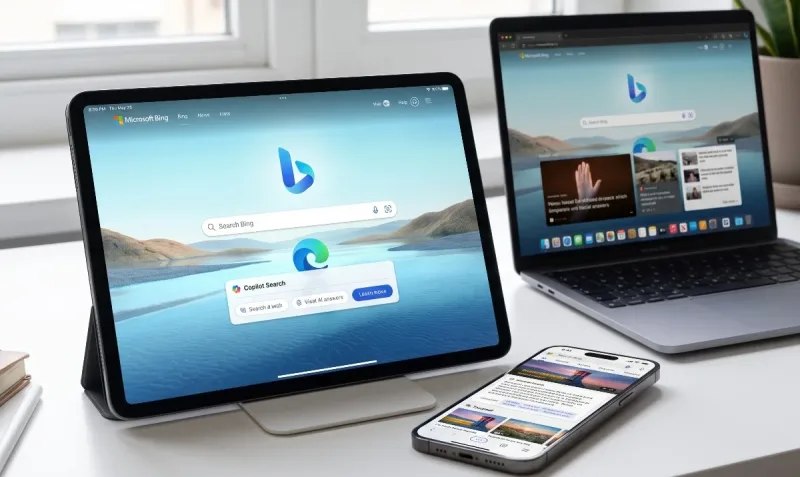
For over a decade, "Bing" was the punchline of tech jokes. On Apple devices, it spent years as little more than a neglected toggle buried inside Safari’s search engine settings—a token alternative that most users skipped without a second thought. If you owned an iPhone, you used Safari and Google, and that was that.
Yet, over the past few years, Microsoft pulled off one of the quietest and most calculated transformations in consumer software. By pairing traditional search index algorithms with conversational generative intelligence, expanding visual recognition tools, and rebuilding its client specifically for iOS and iPadOS, Microsoft turned its search tool into a versatile multi-utility portal.
In this detailed Bing apple apps review, we test how Microsoft Bing performs across Apple’s hardware lineup. Does the app deserve a permanent spot on your iPhone home screen? Can it realistically persuade committed Apple users to step outside the default Safari and Google comfort zone? Let’s find out.
1. Design, Navigation, and the iOS Native Feel
Historically, Microsoft had a reputation for creating mobile ports that felt stiff, boxy, and foreign to Apple’s rounded design aesthetic. Bing’s modern iOS client breaks completely away from that history.
When you launch Bing on an iPhone, the first thing that strikes you is its visual presentation. The app greets you with its signature daily wallpaper—high-resolution wildlife, aerial landscapes, and architectural photography that look stunning on Super Retina XDR OLED displays. Instead of greeting you with a stark, sterile blank white canvas, Bing feels like an inviting digital magazine cover.
Also read: Netflix on Apple Devices
The Home Screen Layout
The interface is clean and thoughtfully anchored near the bottom of the display for easy one-handed navigation:
-
The Omnibox: Located within thumb’s reach, offering immediate text query inputs alongside quick-access buttons for voice dictation, camera search, and Copilot modes.
-
Daily Highlights & Weather: Tidy widgets displaying your local micro-forecast, breaking news headlines, trending cultural topics, and financial market tickers.
-
Microsoft Rewards Tracker: A subtle counter displaying your daily earned points balance in the upper corner without cluttering your search workspace.
The transitions and haptics match iOS expectations. Pull-to-refresh animations glide smoothly, sheet transitions follow standard Apple spring physics, and system-wide Dark Mode adjusts dynamically to your iOS schedule.
2. Copilot Search: Where Traditional Search Meets Generative AI
The centerpiece of the modern Bing application is its deep integration of generative intelligence via Copilot. While standard web search engines still force you to open ten blue links and parse through pages bloated with sponsored affiliate listings, Bing’s integrated Copilot Search approach tackles queries fundamentally differently.
When you type or speak a question—such as "Plan a 3-day budget itinerary in Kyoto focused on historic temples and quiet tea houses"—Bing provides an intelligently structured brief. It doesn't just guess; it retrieves live information, cites its source pages with clickable pill links, and suggests logical follow-up prompts to narrow down transit passes or opening hours.
If you prefer classic search results, the traditional web index is only a swipe away. This hybrid setup represents one of Bing’s biggest competitive advantages over standalone AI chatbots: you are never forced to choose between a web crawler and an LLM. Both live harmoniously inside the same pane.
3. Visual Search and the Built-in Image Creator
Search on mobile is no longer confined to typing into a prompt box. Microsoft leaned heavily into Apple’s camera and neural engine hardware to make Bing an effective visual discovery engine.
Intelligent Lens & Camera Search
Tapping the camera icon opens a visual recognition tool that rivals Google Lens. It excels in several practical everyday scenarios:
-
Product Identification & Barcode Scanning: Pointing your iPhone camera at a bottle of wine, a skincare serum, or an electronics box instantly extracts price comparisons across online vendors.
-
Plant and Animal Identification: Useful during hikes or walks through neighborhood parks, identifying botanical species with accurate taxonomical notes.
-
Math and Text Extraction: If you snap a photo of a receipt, a physical document, or a printed mathematical equation, the app extracts raw text cleanly or walks through algebraic calculations step by step.
Built-in AI Image Generation
Rather than bouncing out to separate third-party graphic generators or web interfaces, the Bing app includes a dedicated image generation engine powered by DALL-E / Designer.
Typing a visual prompt directly into Bing—such as "A minimalist flat vector illustration of an astronaut brewing espresso on Mars, warm pastel colors"—returns four high-resolution renders within seconds. For creators, social media managers, and students drafting mood boards on an iPad, having an image generator embedded right into your mobile search utility saves considerable workflow friction.
4. The Gamification Factor: Microsoft Rewards on iOS
One of the cleverest levers Microsoft holds over Apple’s default ecosystem is Microsoft Rewards.
Apple Safari and Google Search offer no direct material incentives for using their search bars. Bing, by contrast, gives you tangible return on your everyday queries. Every search you run, daily quiz you tap through, or news article you read earns points tied directly to your Microsoft account.
Over the course of a month, regular daily use can comfortably accumulate enough points to redeem:
-
Apple Gift Cards
-
Amazon Gift Cards
-
Xbox Game Pass subscriptions
-
Charitable donations to international non-profits
While earning gift cards shouldn't be the sole reason to adopt a search browser, it provides a compelling perk that Google simply does not match.
5. iPadOS and Mac Integration: Scaling Beyond the iPhone
A comprehensive Bing apple apps review must explore how the experience holds up once you put the iPhone down and transition to larger screens.
The iPad Experience
The iPad version of Bing benefits noticeably from the expanded canvas:
-
Split View & Slide Over: You can dock Bing alongside Apple Notes, Pages, or Safari, allowing you to ask Copilot research questions on one side while writing your essay or report on the other.
-
Pencil & Drag-and-Drop: You can drag generated images or source text snippets straight from Bing’s search panel and drop them cleanly into Keynote presentations or Goodnotes notebooks.
Safari Extension & macOS Interaction
On the Mac, Microsoft does not push a standalone native Bing macOS app; instead, it relies on Bing.com, the Microsoft Edge browser, and Safari search extensions. In macOS Safari settings, you can designate Bing as your default search engine. Doing so pipes system-level Spotlight and Safari address bar queries directly into Bing's search results, offering a unified research thread between your Mac desktop and iPhone pocket client.
6. Bing vs. Google App vs. Apple Safari: How They Compare
| Feature / Metric | Microsoft Bing App (iOS) | Google Search App (iOS) | Apple Safari (Native iOS) |
| Generative AI Chat | Built-in (Copilot live search) | Gemini integration / Overviews | Apple Intelligence integration |
| Search Incentives | Microsoft Rewards (Gift Cards) | None | None |
| Visual Search Tool | Integrated Visual Search | Google Lens (Industry standard) | Visual Look Up (Photos only) |
| AI Image Creation | Yes (Built-in Designer/DALL-E) | Separate toolflows / Limited | Image Playground |
| Daily Aesthetics | Rotating high-res daily photos | Clean, minimalist blank slate | Customizable start page |
| Resource Efficiency | Moderate | Moderate | Extremely High (Battery optimized) |
7. Drawbacks and Annoyances: Where Bing Stumbles
Despite its impressive feature list, Bing on Apple platforms is not without its rough edges:
Cluttered News Feeds
While the daily home wallpaper is gorgeous, scrolling down can feel like stepping onto a tabloid newsstand. The MSN-curated news feed is often crowded with sensationalist clickbait, celebrity gossip, and ads disguised as news tiles. While you can customize topic preferences, turning off the noise entirely takes more digging into settings than it should.
Aggressive Cross-Promotion
Microsoft cannot resist using the Bing app to repeatedly remind you about its other offerings. You will encounter prompts asking you to set Bing as your default widget, download Microsoft Edge, or connect OneDrive. If you prefer quiet, unobtrusive software, this corporate nagging can become grating over time.
Inconsistent Deep-Linking
Occasionally, tapping on specialized external links inside Bing's built-in web viewer fails to trigger the appropriate native iOS apps (such as opening YouTube links directly in the YouTube app or Reddit threads in Apollo/Reddit). Instead, it sometimes traps you within its internal in-app web wrapper.
8. Final Verdict: Does Bing Belong on Your Apple Devices?
Taking a step back, this Bing apple apps review reveals an application that has successfully redefined its purpose. It is no longer just a second-tier search engine trying to mimic Google’s minimalist index; it is an all-in-one generative intelligence, visual discovery, and utility dashboard.
You will love Bing on your Apple devices if:
-
You are tired of sorting through pages of sponsored links and want synthesized, cited answers immediately.
-
You enjoy earning practical gift cards and perks for simple online research through Microsoft Rewards.
-
You want an easy-to-use AI image generator and visual camera tool tucked neatly inside one free app.
-
You already use Windows PCs alongside your iPhone and appreciate seamless search syncing.
You should stick with native Safari or Google if:
-
You demand a minimalist, distraction-free search bar without news feeds or extraneous widgets.
-
You are fiercely protective of your battery life and prefer Apple’s lean, deeply integrated WebKit engine.
-
You dislike promotional prompts encouraging you to adopt Microsoft’s wider software catalog.
Microsoft Bing is no longer the punchline it once was. On iOS and iPadOS, it stands as a capable, feature-packed research companion that brings the best of modern AI directly to your Apple hardware.




Comments
No comments yet. Be the first to ask a question or share an update.
Leave a comment
Your mobile number is never published. Comments appear after review. Website links, email addresses and code are not allowed.