When Meta launched Threads back in July 2023, it felt like an emergency evacuation from Twitter (now X). Tens of millions flooded through the doors within hours, drawn in by the slick single-sign-on integration with Instagram. Yet back then, the app was bare-bones. It lacked basic search filters, direct messages, topic feeds, and native iPad or tablet optimization.
Fast forward past the initial hype and subsequent growing pains: Threads has carved out its own distinct identity as the default water cooler for culture, casual commentary, and creator communities. But how does the day-to-day software hold up across modern devices?
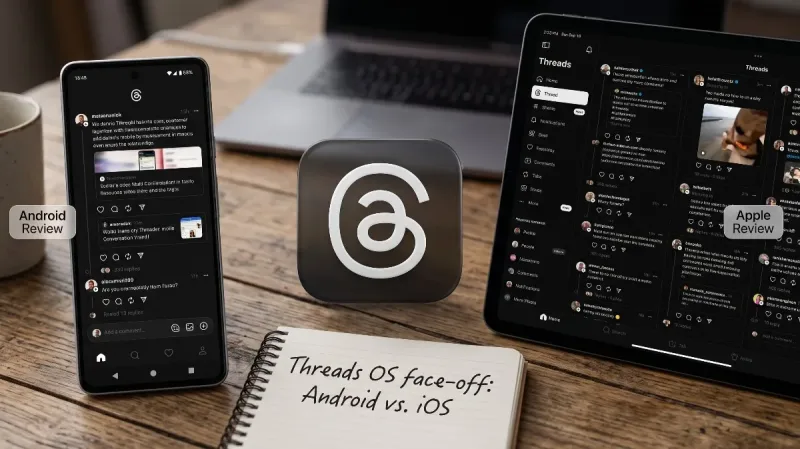
Whether you are debating switching mobile platforms or just trying to decide if the app is worth your phone's battery life, here is a comprehensive breakdown. We dive into a deep Threads android apps review and a balanced Threads apple apps review, comparing real-world performance, feature parity, design nuances, and platform-specific quirks.
The Core Experience: What Threads Does Well Across Both Platforms
Meta clearly designed Threads with simplicity at its core. While other microblogging platforms have grown cluttered with subscription tiers, algorithmic chaos, and bloated crypto feeds, Threads retains a clean, typography-led feed that feels breezy to scroll.
Across both Android and Apple devices, key shared highlights include:
-
500-Character Threshold: Longer than the traditional 280-character post limit, giving writers enough room to share a nuanced thought without needing an external link or screenshot essay.
-
Multimedia Support: Smooth support for 5-minute videos, carousels of up to 10 photos, dynamic voice notes, and inline polls.
-
Granular Moderation: The ability to hide offensive replies, filter specific words, and control exactly who can reply or quote your posts (everyone, people you follow, or mentioned accounts only).
-
Instagram Interoperability: Effortless sharing to Instagram Stories and Feeds, plus the ability to import profile avatars, bio links, and existing follow lists with a single tap.
-
Fediverse Integration: Continued rollout of ActivityPub support, allowing users to connect and interact across decentralized platforms like Mastodon without leaving the core interface.
Beyond the universal feature set, the day-to-day user experience differs subtly between the two mobile ecosystems.
Also read: Private Chats vs. Public Feeds
Threads Apple Apps Review: Polished, Snappy, and Native to iOS
Meta has always treated iOS as its design playground, and Threads on Apple devices is no exception. This Threads apple apps review examines how the app performs on iPhones, iPads, and within the broader Apple ecosystem.
Design and Visual Fluency
The iOS build feels tailored for modern iPhones. Swiping between your "For You" algorithmic feed and chronological "Following" tab relies on smooth, natural gestures. System animations are fluid:
-
Long-pressing a post triggers crisp haptic feedback via the Taptic Engine.
-
Sheet presentations and reply drawers glide up seamlessly without dropped frames.
-
Dark Mode automatically respects system-level schedules and pairs well with Apple’s OLED displays, using deep true-black backgrounds rather than muddy greys.
iPadOS and Vision Support
For a long time, the lack of an optimized iPad app was a glaring flaw. Apple users were forced to run an awkwardly stretched iPhone app with thick black borders.
Subsequent updates solved this with a responsive multi-column layout for iPadOS. The widescreen interface displays notifications or trending topics in a secondary side rail while keeping your primary feed front and center. Split View and Stage Manager support mean you can keep Threads docked on the side of your screen while writing an email or browsing Safari.
Notifications and System Integration
Apple’s notification handling in Threads is prompt and tidy. Interactive notifications allow users to reply directly from the Lock Screen or Dynamic Island alerts. Image previews render crisply, and background app refresh runs quietly without heavy battery drain.
Where the Apple App Stumbles
-
Cache Management: The iOS version tends to quietly balloon its local storage footprint. If you browse heavy photo and video threads daily, the app can consume multiple gigabytes of local cache without an easy in-app button to flush temporary data (often forcing users to delete and reinstall the app).
-
Aggressive Video Pre-caching: Even on limited cellular data plans, the iOS build tends to aggressively buffer high-resolution videos ahead of your scroll position, consuming background bandwidth unless data saver toggles are explicitly enabled.
Threads Android Apps Review: Flexible, Adaptive, and Device-Dependent
Android represents the vast majority of global mobile users, and Meta cannot afford to neglect it. In this Threads android apps review, we look at how the app behaves across the fragmented landscape of modern Android hardware—from Google Pixels and Samsung Galaxies to foldables and budget chipsets.
Material You and Customization
The standout advantage of the Android build is how well it integrates with Android’s system-level design philosophies.
-
Dynamic Color Theming: Threads adapts to Google's Material You engine, subtly tinting UI buttons and accent highlights to harmonize with your system wallpaper.
-
Back Gesture Behavior: Android’s predictive back gestures work reliably throughout Threads. Swiping from the left or right edge lets you preview the previous feed before committing to the swipe, eliminating accidental navigation jumps.
-
Notification Channels: Unlike iOS’s all-or-nothing notification toggles, Android lets you fine-tune exactly what buzzes your pocket. You can mute quote posts while keeping direct replies and mention alerts active.
Foldables and Large-Screen Optimization
Android has outpaced Apple when it comes to foldable hardware, and Threads has kept up. On book-style foldables like the Samsung Galaxy Z Fold series or Google Pixel Fold, opening the device triggers an adaptive two-pane layout. Your feed sits on the left half of the display, while conversation replies open on the right. Transitioning from the exterior cover screen to the unfolded tablet view happens instantly with no layout snapping or UI clipping.
Performance Across Different Chipsets
On flagship processors (such as the Snapdragon 8 series or Google Tensor chips), Threads runs with effortless 120Hz smoothness. Animations and image loading times are practically indistinguishable from the iPhone 15 and 16 Pro lineups.
On mid-tier and budget hardware (MediaTek Dimensity or Snapdragon 6/7 series), Threads still holds up well. Meta’s engineering team has stripped away unnecessary background bloat, keeping memory usage modest compared to the primary Instagram app.
Where the Android App Stumbles
-
Micro-Stuttering on Media Feeds: While text-heavy feeds scroll cleanly, rapid scrolling past threads packed with multiple high-framerate video clips can occasionally introduce faint micro-stutters on devices with variable refresh rate displays.
-
Battery Consumption on Older Builds: On certain modified Android skins (like older versions of Xiaomi's HyperOS or Transsion's HiOS), background sync can occasionally stay active longer than intended, showing higher battery percentages in device maintenance logs.
Direct Comparison: Android vs. Apple Feature Breakdown
To see how both platforms stack up at a glance, here is a breakdown of everyday performance metrics and operational features:
| Feature / Metric | Threads on Apple (iOS / iPadOS) | Threads on Android (Google / Samsung / OEM) |
| Interface Smoothness | Consistent 120Hz ProMotion animations | Smooth on flagships; occasional frame drops on mid-range |
| Tablet / Large Screen Layout | Dedicated multi-column iPadOS interface | Responsive split-pane layout with native foldable optimization |
| System Theming | System Dark / Light Mode | Full Material You dynamic color theme integration |
| Notification Control | Standard iOS Notification groups | Granular Android Notification Channels per alert category |
| Navigation | Standard swipe sheets and tab navigation | Predictive back gestures and native edge navigation |
| Local Cache Control | Requires manual app deletion to clear | Built-in system app settings allow 1-tap cache wiping |
| Haptics | Subtle, nuanced Taptic Engine response | Good on flagships; hardware-dependent on budget devices |
| Media Handling | Crisp in-app camera capture and export | Solid camera capture, optimized for flagship camera APIs |
Content Ecosystem and Algorithm Quality
An app is only as good as the community using it. Software aside, what does using Threads feel like today?
The "Positivity Engine"
Early on, Meta made it clear that Threads would not aggressively amplify hard political arguments or rage-inducing news cycles. Instead, the algorithm skews toward creative hobbies, humor, tech discussions, lifestyle banter, and everyday workplace anecdotes.
For users fatigued by hostility elsewhere, Threads remains a noticeably calmer environment. The comment sections generally maintain a conversational tone, backed by aggressive automated spam filters that keep phishing links and bot replies relatively low.
The Problem with Context Slippage
The biggest algorithmic gripe across both platforms is how frequently the "For You" feed surfaces posts without initial context. You will often see someone responding passionately to an event or trending controversy that took place three days ago, leaving you wondering what sparked the discussion.
Fortunately, spending five minutes setting up your custom "Following" list and pinning topic feeds largely cures this issue.
Privacy, Account Management, and Meta Ties
You cannot review Threads without addressing its foundation: Instagram.
-
Account Separation: When Threads first launched, deleting your Threads account meant deleting your Instagram account. Meta fixed this, allowing users to deactivate or permanently delete their Threads profile independently while keeping their Instagram profile intact.
-
Data Collection: Like all Meta products, Threads collects user identifiers, usage patterns, device IDs, and location data. If privacy and data minimalism are your top priorities, Threads asks for more permissions than decentralized Mastodon clients or privacy-focused platforms like Signal.
-
Cross-App Promotion: If you follow friends on Instagram, Threads will persistently suggest their content. For social butterflies, this makes onboarding effortless; for those wanting a fresh start with an anonymous network, you must actively toggle privacy controls and unlink suggested discovery settings.
Final Verdict: Which Platform Offers the Better Experience?
Threads has matured from a reactionary alternative into a dependable, well-maintained microblogging network.
-
If you live in the Apple ecosystem, the Threads apple apps review leaves a glowing impression. The dedicated iPadOS layout, butter-smooth ProMotion scrolling, and tight integration with iOS system features deliver an exceptionally cohesive and premium experience.
-
If your daily driver is an Android device, this Threads android apps review shows an app that treats the open ecosystem with respect. With robust foldable display support, granular notification controls, seamless predictive back gestures, and simple cache clearing, Android users get a flexible experience that feels right at home on modern hardware.
Ultimately, Meta has closed the gap between platforms. Aside from the iPad’s advantage over non-foldable tablets, both apps deliver fast, reliable, and distraction-free communication that easily outshines the chaotic landscape of legacy text-based social media.




Comments
No comments yet. Be the first to ask a question or share an update.
Leave a comment
Your mobile number is never published. Comments appear after review. Website links, email addresses and code are not allowed.