
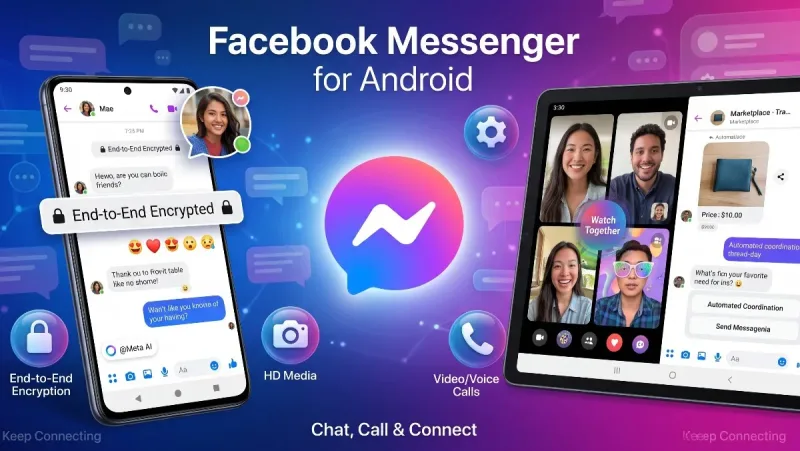
Almost everyone with an Android phone has had Facebook Messenger installed at some point. Born out of Facebook’s decision years ago to unbundle its private messaging system from the primary mobile feed, Messenger quickly expanded from a basic text utility into a standalone communication behemoth. Today, it connects billions across social circles, international borders, and local online marketplaces.
Yet, despite its ubiquitous presence, Messenger often divides users. To some, it is the indispensable hub for keeping up with group chats, high-school friends, and local businesses. To others, it represents an aggressive consumer of battery cycles, background RAM, and screen real estate, constantly testing the line between communication tool and ad-driven social media channel.
Whether you rely on it every day or are debating keeping it on your phone, this comprehensive Facebook Messenger android apps review covers real-world messaging performance, interface usability, security upgrades, Meta AI integration, and the trade-offs of using Meta's flagship chat platform on Android.
Interface & User Experience: Feature-Packed or Overcrowded?
Over the years, Messenger’s interface has undergone multiple redesigns, swinging between extreme minimalism and feature overload. In its current iteration on Android, the app settles on a structured, multi-tab layout that balances personal chats with broader community features.
Also read: Microsoft Outlook Apple Apps Review
The Android Layout
The bottom navigation bar makes switching between active text threads, voice/video call logs, contact rosters, and ephemeral Stories intuitive on modern, tall-screen smartphones.
A persistent row of circular profile icons at the top highlights active contacts, 24-hour Stories, and lightweight Notes (short status updates reminiscent of early status feeds). While this makes reaching frequent contacts fast, it also pushes your actual chat list downward. If you prefer your messaging app to function strictly as an SMS replacement, the social media elements can feel like visual clutter.
Chat Heads (Floating Bubbles)
One of Messenger’s signature Android innovations has always been Chat Heads. Long before Google implemented native system-level notification bubbles into Android, Messenger allowed circular profile icons to float freely over other apps, letting you reply to messages without switching away from your browser or game.
On modern Android devices, Messenger integrates with both its legacy overlay system and native Android notification bubbles. While power multitaskers love the ability to pop open a conversation during navigation or video streaming, Chat Heads can occasionally obstruct screen buttons or cause noticeable touch-lag on budget smartphones with lower RAM capacities.
Communication Arsenal: Text, Media, and Real-Time Calls
Messenger’s enduring popularity stems from its flexibility. You rarely need to know someone's phone number to reach them; as long as they exist on Facebook or share a custom invite link or QR code, you can initiate contact.
1. High-Definition Media and Shared Albums
Historically, Messenger suffered from aggressive image compression that reduced high-resolution photos into blurry thumbnails. Recent updates have overhauled this pipeline:
-
HD Photo and Large File Sharing: Users can toggle HD uploads, sending sharper images and larger media files (up to 100MB) directly in chat threads.
-
Shared Group Albums: Group chats allow participants to pool vacation pictures, event captures, and family videos into organized, collective albums rather than losing individual files in an endless scroll of chat history.
2. Audio & Video Calling
Messenger functions as a dependable VoIP alternative. Voice calls are crisp, while video chats include:
-
Background Noise Suppression: Cleans up ambient hums, traffic noise, and background chatter.
-
Watch Together & Screen Sharing: Allows participants to stream videos, tutorials, or phone screens in real time during a call.
-
AR Filters and Avatars: Interactive virtual masks, color grades, and responsive 3D avatars that track facial expressions for casual calls.
For long-distance international communication—where standard cellular calling and international SMS remain cost-prohibitive—Messenger provides clear, reliable call fidelity over standard Wi-Fi and 4G/5G mobile data.
Meta AI Integration: Smarter Chats or Unwanted Companion?
Generative artificial intelligence has become a core fixture across Meta's software suite, and Messenger on Android showcases this transition prominently.
Integrated directly into the search bar and accessible within individual chats via @MetaAI, the built-in assistant performs several tasks:
-
Quick Query Answers: Settle trivia, calculate bill splits, or summarize factual questions directly within an active group debate without leaving the app.
-
Custom AI Themes and Image Generation: Users can prompt the assistant to generate custom backgrounds, custom stickers, or imaginative digital art on the fly to share with friends.
-
Conversational Assistance: In select business contexts and Marketplace interactions, AI tools provide contextual smart replies and automated inquiry handling.
For casual users who enjoy spontaneous creativity and quick answers, Meta AI adds tangible entertainment value. However, privacy-conscious users often express frustration that the AI assistant sits prominently in the primary search bar with no permanent option to disable or hide it.
Privacy, Encryption, and Account Security
Privacy has historically been the primary criticism leveled against Meta platforms. However, Messenger on Android has introduced major architectural security upgrades over recent years.
| Security Feature | Messenger Default | Google Messages (RCS) | |
| End-to-End Encryption (E2EE) | Default for 1-on-1 | Default for all | Default for RCS |
| Disappearing Messages | Configurable timer | Configurable timer | Limited support |
| App Lock (Biometrics) | Fingerprint / Face Unlock | Fingerprint Unlock | Device PIN / Fingerprint |
| Message Requests Filtering | Segregated folder | Block / Report prompts | Spam folder |
| Phone Number Requirement | Optional (FB Account) | Required | Required (SIM-based) |
Default End-to-End Encryption
Messenger transitioned its core personal chat and call architecture to default end-to-end encryption (E2EE). This means messages and voice calls between individuals are scrambled from sender to receiver, preventing third parties—and Meta itself—from intercepting conversation contents. Users can also set up a secure PIN or cloud backup key to restore encrypted chat history when setting up a new Android phone.
Safety Filters and App Lock
Messenger provides a dedicated Message Requests inbox that isolates direct messages sent by people outside your immediate friends list. Combined with native biometric App Lock, you can require your device's fingerprint or face scanner every time Messenger opens, safeguarding private threads even if you hand an unlocked phone to a colleague or family member.
Marketplace and Commerce: The Small-Business Engine
Beyond social catch-ups, Facebook Messenger serves as an essential engine for local commerce.
In emerging markets and suburban communities alike, Facebook Marketplace is the default platform for second-hand buying and selling. Because transactions and inquiries route directly through Messenger, the app acts as an active point-of-sale tool:
-
Buyers and sellers communicate without exchanging private phone numbers.
-
Automated location pins facilitate meeting spot coordination.
-
Integrated merchant tools allow small businesses to manage product inquiries, share catalogs, and automate customer responses.
For independent entrepreneurs, freelance service providers, and local buyers, this integration alone makes Messenger impossible to uninstall.
Performance, Resource Drain, and the "Lite" Dilemma
While modern high-end phones with 8GB or 12GB of RAM handle Messenger with ease, the app's resource impact remains noticeable on entry-level hardware.
1. Storage and Cache Growth
The Android app package itself is moderately sized, but over weeks of continuous media sharing, voice messages, and cached stickers, local data storage can easily balloon past 1.5GB to 2GB. Users on devices with 32GB or 64GB of internal storage must periodically clear the app’s cache via Android settings to reclaim space.
2. Battery Consumption
With Chat Heads enabled, constant background synchronization, and push notifications firing for group threads, Messenger can consume a noticeable chunk of daily battery life. Restricting background battery usage in Android settings helps, though it can sometimes delay incoming message notifications.
3. The Absence of Messenger Lite
For years, Meta offered Messenger Lite, a stripped-down, lightning-fast app that omitted Stories, heavy games, and animations, focusing purely on text and basic calls. Meta’s decision to sunset Messenger Lite has left budget-conscious users and those on spotty 3G/4G connections stuck with the full, resource-heavy application.
How Messenger Compares to Android Alternatives
To see where Messenger fits into the crowded communications landscape, consider its top competitors:
-
vs. WhatsApp: WhatsApp (also owned by Meta) offers a leaner, less commercialized interface tied strictly to your phone number. It is faster and lighter, but requires sharing personal phone numbers to connect, unlike Messenger's username-based graph.
-
vs. Telegram: Telegram is substantially faster, supports massive file transfers up to 2GB, and boasts superior multi-device synchronization. However, Telegram chats are not end-to-end encrypted by default, and its broader social adoption lags behind Facebook in many regions.
-
vs. Signal: Signal is the undisputed gold standard for absolute privacy, open-source auditing, and minimal data collection. However, convincing non-technical family members to migrate away from Messenger to Signal remains an uphill battle.
Practical Settings to Optimize Messenger on Android
If you use Messenger daily, tweaking these options will significantly improve your experience:
-
Disable Chat Heads if Performance Stutters: If your device experiences frame drops or touchscreen lag, navigate to your Messenger profile settings, select Chat Heads / Bubbles, and toggle them off. Standard notification banners are much gentler on system resources.
-
Review Message Delivery Controls: Under Privacy & Safety > Message Delivery, choose whether people with your phone number or friends of friends can message you directly or must land in your Message Requests folder.
-
Turn On Low Data Mode for Video Calls: If you are on a capped cellular plan, open call settings to enable network data saving, which adjusts video resolution to prevent unexpected overage charges.
-
Schedule Periodic Cache Cleanups: Every couple of months, head to Android Settings > Apps > Messenger > Storage and tap Clear Cache to reclaim several hundred megabytes of system storage without losing your chats.
The Final Verdict
Completing an honest Facebook Messenger android apps review highlights a modern communication powerhouse that excels precisely because of its reach.
Messenger is not the lightest chat application on the Play Store, nor is it free of commercial distractions, promotional elements, and persistent AI nudges. However, default end-to-end encryption, clear voice and video calling, versatile media sharing, and integration with the world’s largest social graph keep it practically essential.




Comments
No comments yet. Be the first to ask a question or share an update.
Leave a comment
Your mobile number is never published. Comments appear after review. Website links, email addresses and code are not allowed.