
Most mobile browser conversations start and end with Chrome. It comes pre-installed on virtually every Android device, handles modern websites without friction, and syncs seamlessly if you live inside Google’s ecosystem. Because of that convenience, millions of Android users never bother switching.
Yet, when you look beneath the surface of the default mobile web experience, the compromises become obvious: aggressive ad tracking, zero support for desktop-style extensions, and an engine monopoly where almost every mobile browser—from Brave to Edge—is just another skin on top of Chromium.
Firefox for Android takes a different path. Built on Mozilla’s independent GeckoView engine, it is one of the only true alternatives on mobile. Over the past year, Mozilla has rolled out radical architectural updates, expanded mobile add-on support to hundreds of community extensions, and refined performance to rival Blink-based competitors.
If you are evaluating whether to ditch your default setup, this hands-on Firefox android apps review breaks down real-world performance, usability, extensions, privacy tools, and the trade-offs you need to know before making the jump.
The Firefox Mobile Landscape: Which App Are You Actually Using?
When searching the Google Play Store for Mozilla's browser, you will encounter multiple offerings. Understanding the differences among these variants is essential:
-
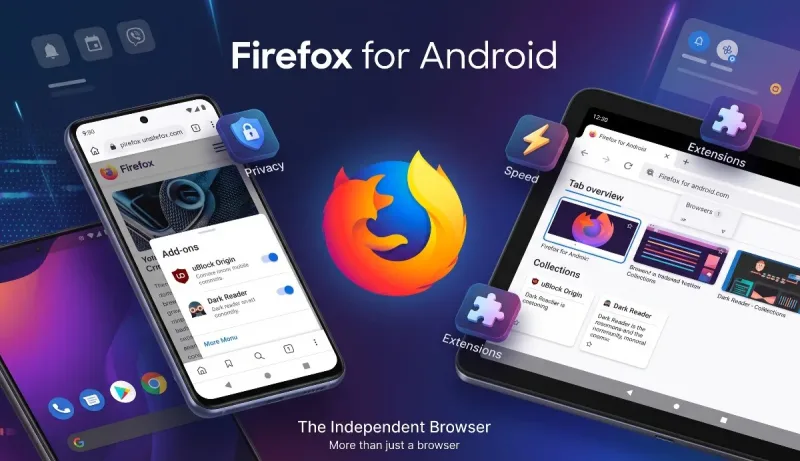
Firefox for Android (Standard): The flagship browser featuring GeckoView, standard tab management, synced collections, and full access to the curated open extension ecosystem.
-
Firefox Focus: A dedicated, single-tab privacy browser. It acts as an automated sandbox—every session starts fresh, trackers are blocked by default, and leaving the app wipes all cookies, tabs, and browsing history with a single tap of the trash can icon.
-
Firefox Beta / Nightly: Developer channels where cutting-edge features land first. Nightly is famous among power users because it allows you to test any desktop extension via custom add-on collection IDs, even those not yet officially certified for mobile.
For everyday use, the standard Firefox app remains the primary contender to replace Chrome.
Interface & Ergonomics: Built for Real Thumbs
Modern Android smartphones routinely feature displays pushing 6.7 inches or larger. Reaching for an address bar at the very top of a tall aspect-ratio screen creates unnecessary ergonomic strain.
One of the best design decisions in Firefox for Android is its bottom toolbar placement. The URL bar, tab counter, and primary navigation buttons sit comfortably within thumb reach at the bottom edge. If you prefer the classic desktop-style layout, a quick toggle in the settings moves it back to the top.
Tab Handling and Collections
Tab management is clean and visual. Tabs are displayed in a compact vertical grid with large previews.
Instead of leaving dozens of tabs permanently open and consuming memory, Firefox includes a Collections feature. Collections allow you to group related tabs—such as travel itineraries, research papers, or shopping lists—and save them directly onto your homepage. You can close those tabs to free up RAM, then restore the entire group later with a single tap.
Extensions: The Killer Feature Chrome Won't Give You
If there is a single decisive reason to switch to Firefox on Android, it is extension support.
On the desktop, extensions are indispensable tools for productivity, privacy, and user experience. Yet Google Chrome on Android has deliberately withheld extension support for years. Using mobile Chrome means navigating the web without your password manager overlay, without advanced script blocking, and without cosmetic site fixers.
Firefox treats mobile users like desktop power users. Mozilla launched its open mobile add-on ecosystem to bring hundreds of extensions directly to the standard Android app.
Top Mobile Add-ons Tested in Firefox:
-
uBlock Origin: The gold standard of content blocking. On mobile, uBlock Origin doesn't just block invasive video and banner ads; it halts battery-draining telemetry scripts and cuts down overall mobile data usage significantly.
-
Bitwarden / 1Password: Native autofill in Android can be finicky. Having dedicated browser extensions ensures immediate, reliable credential filling directly inside web forms.
-
Dark Reader: Inverts harsh bright backgrounds on web pages that lack a native dark mode, significantly reducing eye strain during night reading while saving battery on OLED panels.
-
Bypass Paywalls Clean & Privacy Badger: Essential utilities for privacy enthusiasts looking to minimize tracking beacons and read content cleanly.
Installing these extensions takes two taps via the in-app "Add-ons" menu. Once installed, they function identically to their desktop counterparts, complete with full preference dashboards and custom filter lists.
Privacy Architecture: Beyond Basic Incognito
Privacy on mobile is often marketed through "Incognito" modes that do little more than prevent your local history from saving. When conducting an in-depth Firefox android apps review, Mozilla’s approach to background data handling stands out.
Enhanced Tracking Protection (ETP)
Firefox comes standard with Enhanced Tracking Protection set to Standard mode, with the option to switch to Strict.
| Protection Feature | Standard Mode | Strict Mode | Chrome Default |
| Cross-Site Cookie Tracking | Blocked | Blocked | Permitted / Phased |
| Cryptominers | Blocked | Blocked | Not explicitly blocked |
| Fingerprinters | Blocked | Blocked aggressively | Permitted |
| Tracking Content in Private Tabs | Blocked | Blocked everywhere | Not blocked |
ETP isolates cookies on a per-domain basis (Total Cookie Protection). This prevents advertising networks from building an unconsented digital dossier on your reading habits as you move between different websites.
True Total Cookie Protection
Unlike browsers that rely solely on simple URL blocking lists, Firefox’s containerized cookie architecture confines cookies to the site where they were created. A tracking cookie planted by a retail website cannot communicate with a social media widget embedded on a news portal. This structural isolation cripples cross-site profiling without breaking logins or session persistence.
Performance, Stability, and Battery Benchmarks
Historically, Firefox for Android suffered from a reputation of feeling slightly heavier and slower than native Chrome. The transition to the rewritten "Fenix" codebase and ongoing optimization of the GeckoView engine have changed the equation.
Real-World Page Load Times
On everyday pages (Wikipedia, Reddit, news outlets, GitHub), load speeds between Firefox and Chrome are virtually indistinguishable on modern mid-range and flagship hardware (Snapdragon 7-series and 8-series processors).
In practice, Firefox paired with uBlock Origin frequently outpaces stock Chrome on ad-heavy commercial news sites. Because Firefox terminates hundreds of tracking scripts, tracking pixels, and video ad players before they initialize, the actual render time for text and main content is noticeably faster, consuming fewer CPU cycles and less cellular data.
Battery Consumption
Background battery usage is well-managed. GeckoView suspends inactive background tabs efficiently. Over a continuous 4-hour reading and browsing session over 5G:
-
Firefox (with uBlock Origin): ~11% battery drain
-
Google Chrome (no ad blocking): ~13.5% battery drain
The difference comes down to ad processing. Rendering high-resolution, script-heavy video advertisements consumes processing power and drives up thermal output, giving an ad-blocked Firefox an indirect efficiency advantage.
Cross-Device Ecosystem & Sync
The mobile browser does not live in isolation; it must integrate with your desktop workflow.
Firefox Sync uses client-side encryption. When your bookmarks, saved logins, open tabs, and browsing history leave your phone, they are encrypted with your personal credentials before reaching Mozilla’s servers. Mozilla cannot decrypt or inspect your browsing patterns for commercial ad targeting.
Tab Handoff
One subtle quality-of-life feature is Send Tab to Device. Right-clicking a tab on your desktop Firefox allows you to send it directly to your Android device via push notification, opening instantly upon arrival. Going the other direction, hitting "Share" in Android lets you send mobile links directly to your desktop workstation, bypassing the need to message links to yourself over chat apps.
Where Firefox on Android Still Falls Short
No objective review is complete without examining rough edges. While Firefox excels in user control and security, it encounters specific friction points:
-
Occasional Site Incompatibility (The Chromium Web): Because the vast majority of web developers optimize exclusively for Google’s Blink engine, you will occasionally stumble upon a banking portal or web application that renders improperly in GeckoView. While rare, it happens often enough that keeping Chrome installed as a backup remains practical.
-
Progressive Web App (PWA) Handling: Chrome integrates deeply with Android's system-level APK generation for PWAs. Firefox supports adding web pages to your home screen, but the installation and background notifications for web apps do not always feel as native or responsive as Chrome’s WebAPK integration.
-
Hardware Acceleration Nuances: On select budget devices featuring entry-level MediaTek or Unisoc chips, scrolling heavy image feeds can exhibit minor micro-stutters compared to the hardware-accelerated rendering pipelines optimized specifically for Chrome by chipset vendors.
How Firefox Compares to Mobile Rivals
To see where Firefox sits in the broader Android ecosystem, consider how it stacks up against the other major contenders:
| Browser | Rendering Engine | Extension Support | Default Ad/Tracker Blocking | Ecosystem Ties |
| Firefox | GeckoView | Extensive (Curated store) | Strong (ETP + Add-ons) | Mozilla Account |
| Google Chrome | Chromium / Blink | None | Minimal | Google Account |
| Brave | Chromium / Blink | None | Excellent (Brave Shields) | Independent Sync |
| Samsung Internet | Chromium / Blink | Limited (Content blockers only) | Moderate (Via add-on apps) | Samsung Cloud |
| Vivaldi | Chromium / Blink | None | Built-in ad blocker | Vivaldi Account |
If your primary objective is breaking away from the Chromium rendering monoculture while retaining desktop-caliber extension customization, Firefox is practically the only game in town.
The Verdict: Should You Make the Switch?
Conducting a thorough Firefox android apps review reveals an app that has matured from an ambitious alternative into a daily driver.
Firefox for Android is not trying to be a carbon copy of Chrome. It provides an ergonomic interface built for large smartphone screens, robust privacy architecture, and, above all, the freedom to run extensions like uBlock Origin, Dark Reader, and standalone password managers right on your phone.
If you rely heavily on Google-specific services like seamless Google Pay autofill or use niche enterprise web apps optimized exclusively for Chromium, Chrome will remain a necessary tool on your device.


Comments
No comments yet. Be the first to ask a question or share an update.
Leave a comment
Your mobile number is never published. Comments appear after review. Website links, email addresses and code are not allowed.