
Most mobile web browsers promise a fast, modern window to the internet, but they also double as data collection hubs. Every search, tap, and idle scroll is logged, matched against advertising profiles, and fed through an ecosystem designed to know what you want before you do. If you use a standard smartphone, your default mobile browser is quietly broadcasting your digital footprint hundreds of times a day.
That reality is why privacy-focused tools exist. If you have been looking for an everyday mobile browser that genuinely respects your boundaries without requiring a degree in computer engineering to configure, you have likely run into the duck.
In this hands-on DuckDuckGo android apps review, we examine how the DuckDuckGo Private Browser performs on Android, whether its flagship privacy features hold up under daily use, and whether it has what it takes to replace Google Chrome as your primary browser.
What Makes DuckDuckGo Different on Android?
Most people know DuckDuckGo as an alternative search engine—the privacy-first competitor to Google that doesn’t build search profiles or track query histories. But on Android, DuckDuckGo is a standalone browser app with a built-in suite of system-level privacy protections.
Unlike running private search queries inside Chrome, installing DuckDuckGo on your phone gives you an end-to-end sandbox. It handles everything:
-
Third-party web tracker blocking
-
Automatic encrypted HTTPS upgrades
-
Cookie consent popup suppression
-
Built-in private search engine
-
Device-wide app tracking protection
-
Direct-to-video ad-free viewing via Duck Player
The design philosophy is straightforward: Privacy shouldn't feel like a chore. Instead of burying security settings under dozen-layer submenus, DuckDuckGo sets everything to maximum protection out of the box.
Also read: Brave Private Browser Android Apps Review
Core Features Breakdown
1. The Fire Button: Instant Digital Reset
The most famous visual element in DuckDuckGo is the small flame icon sitting beside the URL bar. Tap it, and your open tabs, browsing history, cache, and session cookies disappear in a brief burn animation.
While clearing history in Chrome or Firefox requires navigating menus, selecting checkboxes, and confirming timeframes, DuckDuckGo makes data wiping an effortless single tap. You can customize the animation or automate it so your browsing slate cleans itself every time you leave the app. For anyone who routinely checks sensitive financial sites, medical questions, or travel deals, this feature alone makes mobile browsing significantly less stressful.
2. App Tracking Protection (The Real Game Changer)
If there is a killer feature in the Android version of DuckDuckGo, this is it.
Google’s Android ecosystem is notorious for background tracking. Even when you are not actively using your phone, apps like games, social media clients, fitness trackers, and shopping tools constantly transmit telemetry and diagnostic data to third-party ad networks.
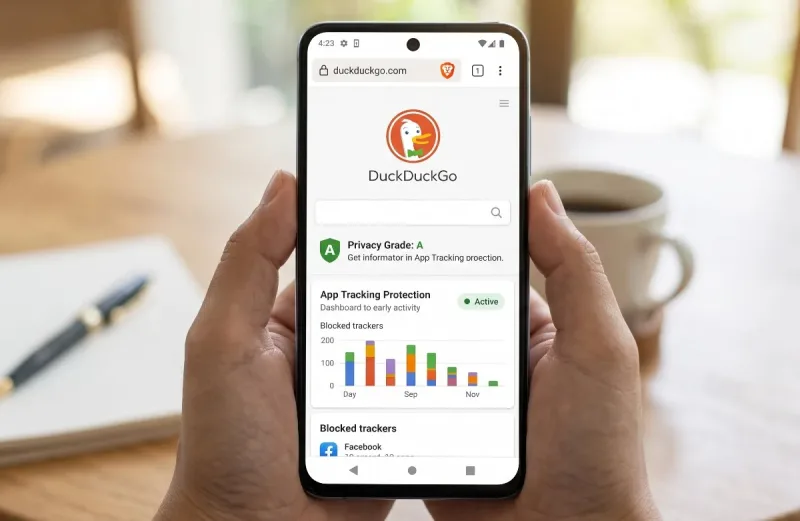
DuckDuckGo addresses this through a built-in feature called App Tracking Protection. It creates a local VPN tunnel on your device. Notice the keyword: local. Unlike commercial VPNs that route all your internet traffic through a remote server, DuckDuckGo filters data packets entirely on your hardware. When an installed app attempts to phone home to a known tracker (such as Facebook Audience Network, AppsFlyer, or Google Analytics), DuckDuckGo intercepts and blocks the call right at the gate.
Open the app's protection dashboard after 48 hours, and the numbers are staggering. A typical smartphone user will see tens of thousands of background tracking attempts blocked across dozens of apps, complete with timestamps and company names. It acts essentially as an open-source audit of how invasive your other apps really are.
3. Smarter Tracker Blocking and Privacy Grades
When you load a website in DuckDuckGo, the address bar displays a shield icon. Tapping that shield reveals the site’s Privacy Grade, showing:
-
How many tracking scripts were blocked
-
Whether the connection uses modern encryption (HTTPS)
-
Who owns the tracking domains detected on that page
DuckDuckGo automatically intercepts third-party trackers before the webpage even finishes rendering, preventing tracking networks from building cross-site behavioral profiles.
4. Duck Player: Distraction-Free Video
YouTube is indispensable, but mobile web viewing is often plagued by intrusive interstitial ads, algorithmic recommendations, and aggressive data profiling. DuckDuckGo includes Duck Player, a lightweight embedded player that opens YouTube links in a clean, stripped-down interface.
It strips out personalized ad targeting, blocks tracking cookies from building your YouTube viewer profile, and cuts out recommended rabbit holes, giving you the video you tapped on and nothing else.
5. DuckDuckGo AI Chat and Privacy Pro
Recent updates have introduced DuckDuckGo AI Chat, allowing you to query popular AI models (like Claude and GPT-based engines) anonymously without linking queries to a permanent account. For power users, the company also offers an optional paid bundle, Privacy Pro, which adds a system-wide paid VPN, personal data broker removal, and identity theft restoration services.
Daily Performance: Speed, Battery, and Usability
Privacy tools frequently suffer from a common flaw: they can be clunky, slow, and prone to breaking everyday websites.
In day-to-day testing on Android, DuckDuckGo avoids these traps surprisingly well. Because the browser actively blocks heavy scripts, tracking pixels, and video ad frames before they load, pages frequently render faster than they do in standard Chrome.
| Metric / Aspect | DuckDuckGo Android App | Google Chrome (Android) |
| Page Load Speed | Fast (scripts blocked early) | Fast (heavy pre-fetching) |
| Tracker Blocking | Native & Active by default | Permissive (relies on Google ad ID) |
| System-wide App Shield | Yes (App Tracking Protection) | No |
| Resource & Battery Impact | Minimal (lightweight engine) | Moderate to High (memory intensive) |
| Extension Support | None | None |
| One-Tap Data Wipe | Dedicated Fire Button | Multi-step menu process |
Battery drain is negligible. Even with App Tracking Protection running 24/7 in the background, the local VPN uses barely 1% to 2% of overall daily battery life, which is often offset by the power saved from not loading tracking scripts.
The interface is uncluttered and minimal. The tab manager organizes sites cleanly, the search bar responds instantly, and switching between light and dark modes is seamless.
Where DuckDuckGo Falls Short
No software is perfect, and making DuckDuckGo your primary Android browser does involve some trade-offs.
1. No Browser Extension Support
If your mobile workflow depends heavily on desktop-grade browser add-ons—such as password managers that require browser integration, Grammarly, or custom user scripts—DuckDuckGo will feel limiting. Unlike mobile browsers like Firefox Nightly or Kiwi Browser, DuckDuckGo does not support third-party extensions.
2. Search Results Can Lack Hyper-Local Precision
Because DuckDuckGo does not track your physical movements or store persistent location histories, local business searches can sometimes feel less tailored than Google’s. If you search "best tacos near me" at midnight, Google knows your exact curb coordinates and opening hours instantly. DuckDuckGo relies on general geolocation queries, which may require you to type your neighborhood or postal code manually for accurate local results.
3. Cross-Device Tab Sync is Basic
If you want tabs seamlessly mirrored in real-time between an Android tablet, a Windows PC, and a Mac without a second thought, Google Chrome and Apple Safari still provide the smoothest ecosystem glue. DuckDuckGo has introduced private cross-device sync (using encrypted QR-code pairing rather than cloud accounts), but it lacks the frictionless immediacy of big-tech cloud profiles.
Is It Better Than Brave and Firefox?
When evaluating privacy browsers on Android, three names dominate the discussion: DuckDuckGo, Brave, and Mozilla Firefox.
-
Choose DuckDuckGo if you want zero setup, a minimal interface, and device-wide protection against Android app trackers. It is the easiest browser to recommend to friends and family because it never breaks sites or requires manual adjustments.
-
Choose Brave if you want aggressive cosmetic ad blocking (including complete blanking of banner ad containers) and Chromium-based site compatibility, though you will have to ignore its Web3/crypto marketing features.
-
Choose Firefox if you want true open-source modularity and want to install specific desktop-class extensions like uBlock Origin or Dark Reader on your phone.
The Verdict
DuckDuckGo for Android proves that you don't need to be a cybersecurity specialist to browse the web with dignity.
It doesn’t overwhelm you with confusing configuration menus, crypto tokens, or complex filtering rules. Instead, it offers a lightweight, snappy mobile browser with sensible privacy defaults. When you factor in the App Tracking Protection tool—which protects not just your browsing, but the rest of your installed apps—DuckDuckGo punches well above its weight class.





Comments
No comments yet. Be the first to ask a question or share an update.
Leave a comment
Your mobile number is never published. Comments appear after review. Website links, email addresses and code are not allowed.