
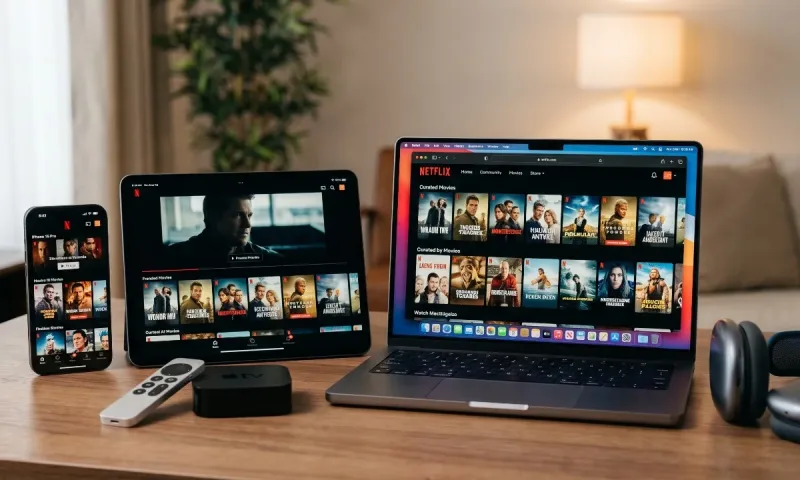
When two of tech’s most influential titans cross paths in the living room and pocket, expectations are naturally elevated. Apple is renowned for fluid animations, tactile hardware synergy, and meticulous interface design; Netflix is the benchmark for global streaming infrastructure, recommendation algorithms, and binge-worthy original productions.
Yet, streaming Netflix across the Apple hardware portfolio is rarely a uniform experience. Depending on whether you pick up an iPhone, settle down with an iPad, click on the Siri Remote via Apple TV 4K, or attempt to stream inside Apple’s Vision Pro ecosystem, your experience will swing between peerless delight and deliberate corporate friction.
In this comprehensive Netflix apple apps review, we dismantle how the red-letter streaming giant behaves across every major screen in Apple’s universe. We examine real-world performance, feature integration, download stability, audio-visual fidelity, and the stubborn wall dividing Cupertino’s system-level ecosystem from Netflix’s walled garden.
The Great Wall: System Integration and the Apple Ecosystem
Before evaluating individual devices, we have to tackle the elephant in the living room: ecosystem cooperation.
Apple’s philosophy revolves around seamless cross-app discovery. The native Apple TV app is engineered to aggregate your viewing habits into a universal "Up Next" queue, letting you resume shows from Disney+, Max, Paramount+, Prime Video, and Apple TV+ without constantly diving into separate applications. Siri global search is designed to pull up matching titles across all your subscriptions.
Netflix, however, famously refuses to participate in Apple’s "Up Next" aggregation.
You will not find Netflix originals populating your universal Apple TV queue. If you pause Stranger Things on your Apple TV box, Apple’s dashboard won't tell you you’re midway through Episode 4; you must click directly into the dedicated Netflix app to resume it. Netflix deliberately shields its telemetry and user engagement data from Apple to preserve its direct consumer relationship.
The friction doesn't stop there:
-
Billing via Apple In-App Purchase: You cannot subscribe to Netflix via Apple's App Store payments. To avoid Apple’s platform fees, sign-ups and tier upgrades must occur externally in a browser.
-
Apple Vision Pro Native App: Netflix chose not to develop a native visionOS client or permit its iPad app to run natively on the Vision Pro, forcing spatial headset users to browse through Safari.
Understanding this dynamic explains why Netflix apps on Apple hardware often feel like isolated kingdoms: technically robust, but fundamentally unwilling to surrender control to Apple's native software frameworks.
Also read: TechCrunch Apps Review
Netflix on iPhone (iOS): The Gold Standard of Mobile Streaming
On iOS, Netflix is practically flawless. It represents decades of engineering refinement focused on mobile responsiveness, variable network adaptation, and travel convenience.
1. Navigation and UI Polish
The interface on modern iPhones leverages ProMotion 120Hz displays with silky transitions. The home screen balances promotional headers with your curated rows.
The "My Netflix" hub serves as an intuitive personal locker. It consolidates downloaded episodes, your watchlist, titles you’ve given a thumbs-up, and trailers you've recently previewed. Switching profiles takes two quick taps, and face-recognition authentication prevents little hands from wandering into adult profiles.
2. Playback Engine and Video Fidelity
Video playback on Super Retina XDR OLED screens is striking. Netflix streams Dolby Vision HDR to compatible iPhone models, rendering deep shadow detail and dazzling highlights without washing out color saturation.
Controls during playback are responsive:
-
Double-tap forward or backward skips 10 seconds reliably.
-
The scrub bar provides thumbnail previews for exact scene targeting.
-
Subtitle and audio tracks switch instantaneously without buffering pauses.
-
Picture-in-Picture (PiP) allows seamless background listening or dual-tasking while texting or checking maps.
3. Smart Downloads & Data Economy
For commuters and frequent flyers, offline performance is vital. Netflix offers two primary download controls:
-
Manual Downloads: Select standard or high quality per title.
-
Smart Downloads: When connected to Wi-Fi, the app automatically deletes watched episodes and fetches the next chapter in the series, saving local storage while keeping your queue fresh.
Netflix on iPad (iPadOS): The Ultimate Portable Cinema
Taking the mobile framework to a larger canvas, the iPad app balances portability with cinema-grade audiovisuals.
Screen Ratios and Black Bars
Most iPads sport an aspect ratio hovering around 4:3 or ~1.43:1 (with certain Air and Pro models around 16:10 or 1.4:1). Because modern cinematic content is filmed in 16:9, 2:1, or 2.39:1 anamorphic widescreen, letterboxing (black bars above and below the image) is inevitable.
However, on the Liquid Retina XDR and Ultra Retina OLED panels found on iPad Pro models, those black bars are pure inky black. There is zero backlight bleed, making cinematic aspect ratios punchy and contrast-rich.
The Audio Advantage: Spatial Audio with Head Tracking
Pairing an iPad with AirPods Pro or AirPods Max elevates the viewing session into a private theater. Netflix supports Apple’s Spatial Audio with dynamic head tracking. As you shift your gaze or turn your head away from the iPad, the dialogue anchors cleanly to the virtual display in front of you, while environmental sound effects swirl realistically around your acoustic perimeter.
Multitasking Capabilities
iPadOS power users will appreciate Netflix’s multitasking compliance:
-
Picture-in-Picture: The floating video player can be resized or tucked into the screen edge while browsing documents or taking notes.
-
Split View & Slide Over: While you cannot split the active video feed side-by-side with another active window without triggering PiP, the catalog navigation works effortlessly in partitioned workspaces.
Netflix on Apple TV 4K (tvOS): Speed vs. System Neglect
The Apple TV 4K box is arguably the most capable streaming hardware on the planet, equipped with processing power that runs rings around conventional smart TV chips and streaming sticks. In this environment, the Netflix app displays both its greatest strengths and its most frustrating design decisions.
| Feature / Metric | Netflix on tvOS (Apple TV 4K) | Smart TV Native Apps (LG webOS / Samsung Tizen) |
| Interface Fluidity | Instantaneous; zero menu lag or frame drops | Frequently stutters during auto-play video rows |
| Format Support | 4K UHD, Dolby Vision, HDR10, Dolby Atmos | 4K UHD, Dolby Vision, HDR10+, Dolby Atmos |
| System "Up Next" Queue | Unsupported (Refuses integration) | N/A (Standard launcher) |
| Top Shelf Preview | Functional for quick resume rows | Generic vendor promotion rows |
| Audio Routing | Native support for HomePod Stereo & Spatial AirPods | Bluetooth stereo or eARC pass-through only |
| Frame Rate Matching | Flawless auto-switching (24.000 / 23.976 fps) | Inconsistent depending on manufacturer TV firmware |
1. Velocity and Navigation
Because the Apple TV 4K runs on Apple silicon, browsing Netflix is lightning fast. Rows load immediately, image cards populate without placeholder delays, and scrubbing through multi-gigabyte 4K streams is smooth.
However, the user interface design has stagnated. Netflix on tvOS does not use Apple’s native video player interface; it deploys a custom, unified web-based shell. Navigating fast-forward or rewind intervals via the Siri Remote’s circular clickpad can feel floaty and imprecise compared to native apps like Infuse or Apple TV+.
2. Reference-Grade AV Performance
Where the tvOS app shines without compromise is AV output:
-
Match Dynamic Range and Match Frame Rate: When enabled in tvOS settings, Netflix commands your display to switch its refresh rate precisely to 24p or 60p, eliminating judder during cinematic panning shots.
-
Dolby Atmos Audio: The app outputs uncompressed spatial metadata decoded via multichannel LPCM, ensuring surround-sound tracks reproduce overhead pans with distinct separation.
-
HomePod Cinema Mode: If your living room utilizes paired HomePods, dialogue clarity and low-end impact bypass the tinny speakers of your flat-screen without configuration headaches.
What About the Mac and Apple Vision Pro?
When evaluating Apple hardware, laptops and spatial computing cannot be overlooked. Here, the story shifts dramatically from native applications to web wrappers.
Netflix on macOS: The Missing App
There is no native Netflix app for macOS. Despite modern MacBooks running on Apple Silicon (M-series chips capable of running iOS apps natively), Netflix purposefully checks a box in the App Store developer console to block its iPad app from running on macOS.
-
Browser Constraints: To watch Netflix on a Mac, you must navigate to Safari, Chrome, or Edge.
-
Resolution Differences: To view 4K HDR streams on a Mac, you must use Apple Safari on an Apple silicon machine with macOS Big Sur or later. Chrome and Firefox on macOS are restricted to lower-resolution ceilings (often 720p or 1080p) due to Widevine DRM compliance limits.
-
No Offline Downloads: Because there is no desktop client, travelers cannot download Netflix titles onto their MacBook for offline flights. This remains one of the community's biggest complaints.
The Apple Vision Pro Void
Apple's spatial computer launched with great fanfare, yet Netflix declined to publish an app for visionOS. Vision Pro owners must load netflix.com inside a floating Safari window.
While the virtual window can be expanded to massive dimensions, it lacks custom cinema environments (such as Disney’s virtual drive-in theater or the Apple TV app's Mount Hood backdrop) and prevents offline caching for travel.
Netflix Games on iOS: The Overlooked Subscription Perk
One area where Netflix’s iOS integration deserves genuine praise is its Games library.
Included at no added cost with every subscription, Netflix publishes dozens of premium mobile games directly through the iOS App Store. Instead of packing them with predatory microtransactions, energy meters, or pop-up ads, Netflix funds complete, premium titles:
-
Award-Winning Indie Masterpieces: Titles like Hades, Oxenfree II, Kentucky Route Zero, and Into the Breach.
-
Blockbuster Tie-Ins: Full console ports like Grand Theft Auto: The Trilogy – The Definitive Edition.
-
Casual Hits: Refined, ad-free puzzle and puzzle-adventure titles tailored for short iPhone breaks.
When you install these games via the App Store, you simply log in with your Netflix profile credentials to unlock the full game. For parents seeking quality children’s games free of in-app monetization traps, this feature alone adds substantial value to the ecosystem.
Strengths, Weaknesses, and Feature Breakdown
To summarize where the software succeeds and where it falls behind across the Apple lineup:
What Works Exceptionally Well
-
Pristine Playback Performance: Reliable adaptive streaming, instantaneous resolution ramp-up, and zero buffering on decent connections.
-
Uncompromising AV Standards: Reference implementation of Dolby Vision, HDR10, and Dolby Atmos across iPhone, iPad, and Apple TV 4K.
-
Personalized Profiles: Robust parental pin controls, personalized watchlists, and algorithmic recommendations remain best-in-class.
-
Curated Mobile Gaming: A large library of ad-free premium games included directly with your subscription.
-
Apple Audio Synergy: Seamless integration with AirPods Spatial Audio, dynamic head tracking, and HomePod stereo pairs.
Where Frustrations Persist
-
Zero Apple TV App "Up Next" Sync: Refusal to integrate with Apple's centralized content hub degrades home-screen convenience.
-
Absent Mac Offline Mode: No native desktop app means zero offline downloads on MacBooks.
-
Vision Pro Neglect: Reluctance to build for visionOS leaves spatial headset adopters with a standard browser window.
-
Non-Native Scrubbing UI: Apple TV 4K playback controls can feel floaty compared to tvOS system-native scrubbers.
-
Account Friction: Inability to manage subscriptions or upgrade plans directly inside the iOS interface due to anti-steering policies.
The Final Verdict
The Netflix software suite across Apple hardware presents a fascinating dichotomy.
Evaluated strictly on technical stability, video encoding quality, responsiveness, and portable convenience, the apps for iPhone, iPad, and Apple TV 4K remain the gold standard for global streaming platforms. You rarely encounter dropped frames, audio-video desync, or broken downloads. If you want to fire up a series on an iPad during a transcontinental flight or stream an HDR documentary on an Apple TV 4K connected to an OLED theater, nothing matches its rock-solid reliability.
However, evaluated on ecosystem citizenship, Netflix acts as a reluctant guest. By deliberately ignoring the universal Apple TV guide, blocking iPad app installation on M-series Macs, and sidelining the Vision Pro, Netflix reminds us that platform politics frequently take precedence over seamless user convenience.




Comments
No comments yet. Be the first to ask a question or share an update.
Leave a comment
Your mobile number is never published. Comments appear after review. Website links, email addresses and code are not allowed.