
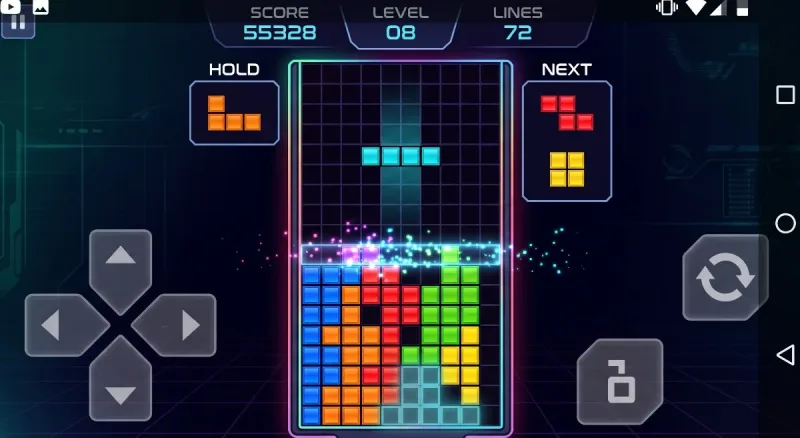
Few video games have survived across four decades without changing their foundational rules. You do not need a narrative cutscene, an introductory tutorial, or an elaborate lore book to understand what to do when four connected geometric squares fall from the top of the screen. You rotate the shape, guide it into place, complete horizontal lines, watch them dissolve with a rewarding sound effect, and clear space before the stack creeps to the ceiling.
Yet adapting this timeless Soviet-born masterpiece for modern pocket devices has proved surprisingly contentious. If you are browsing the Google Play Store looking for an authentic Tetris android game review, you probably want to know whether the modern mobile client—now primarily handled by publisher PlayStudios under official license—honors the purity of the game or weighs it down with modern mobile monetization.
The reality sits right in the middle: the underlying puzzle remains bulletproof, but the shell around it tells a very modern mobile gaming story.
The Legacy of Tetris in Your Pocket
Tetris and handheld gaming share linked DNA. Back in 1989, Nintendo bundled Alexey Pajitnov’s creation with the original Game Boy, transforming a chunky grey plastic handheld into an international cultural sensation. It was portable, immediate, and infinitely replayable.
On Android, touchscreens should theoretically represent the ultimate evolution of that handheld legacy. There are no physical cartridges to swap, screens are vibrant OLED panels, and processors can render instant calculations without breaking a sweat.
Over the past two decades on mobile, we have seen various custodians manage the brand—most notably Electronic Arts for a long stretch, followed by the transition to PlayStudios. Each iteration has had to grapple with the same design hurdle: how do you bring a game that relies on microsecond-accurate physical directional inputs to a piece of slick flat glass?
Also read: Sunshine, Heists, and Mayhem
Controls: Swipe vs. On-Screen Buttons
In high-speed puzzle games, control latency and misinputs are the difference between setting a personal record and topping out in disaster. The official Android release tackles this with two main control configurations:
1. Touch Gesture Controls
By default, the game encourages swipe-based interactions:
-
Swiping left or right glides the active tetromino across columns.
-
Tapping the display rotates the piece clockwise.
-
Flicking downward triggers a soft drop.
-
A decisive, sharp pull down executes an instant hard drop.
At lower speeds (Levels 1 through 7), gesture controls feel modern, fluid, and natural. Swiping across a smooth glass screen gives the game an organic rhythm. However, once the gravity ramp kicks in around Level 10 and pieces drop at breakneck speeds, swipe input fatigue becomes noticeable. A swipe intended to slide a long "I-bar" three columns over can accidentally register as a screen tap, rotating the bar vertically and jamming it awkwardly into a gap it was never meant to occupy.
2. On-Screen Virtual Buttons
To combat swipe ambiguity, the settings menu provides on-screen digital buttons. This emulates an old-school d-pad layout with dedicated rotation and drop toggles.
While virtual buttons eliminate accidental tap-rotation glitches, they introduce visual crowding on standard phone screens. Your thumbs naturally obscure parts of the bottom matrix, requiring you to train your peripheral vision upward toward the spawn chute.
For purists seeking absolute competitive precision, connecting an external Bluetooth controller or a USB-C gamepad remains the gold standard, turning your phone into an ultra-responsive pocket arcade unit.
Game Modes: Solo Zen to Quick Reflexes
The Android app splits its experience across several distinct play styles, catering both to casual time-killers and high-score chasers.
Classic Marathon
Marathon mode is the soul of Tetris. You begin at a leisurely pace, clearing single lines, doubles, triples, and holding out for the coveted four-line "Tetris" clear using the cyan line piece.
The progression curve remains pitch-perfect. As the levels climb, the background hues shift, the audio quickens, and the gravity forces you into pure instinctual play. The flow state—the psychological zone where conscious deliberation fades and fingers react faster than speech—is just as potent here as it was thirty years ago on CRT televisions.
Quick Play & Daily Challenges
For quick breaks during short commutes, short-burst modes cap the timer or challenge you to clear a predetermined number of lines under special conditions (such as clearing specific pre-arranged "garbage" rows). These scenarios offer immediate bite-sized objectives, complete with small daily reward tracks that encourage you to return each morning.
Competitive Royale & Tournaments
Borrowing inspiration from modern competitive multiplayer titles, the mobile client incorporates limited-time multiplayer tournaments and survival bracket modes. Racing against live player boards on a split screen injects an adrenaline rush into what is traditionally an introspective solo experience. Sending garbage lines to disrupt an opponent’s carefully stacked column brings competitive tension directly to your touchscreen.
Audio and Visual Presentation
Visually, the official client leans into clean neon aesthetics, dark backgrounds, and bright, high-contrast tetrominoes that pop on modern mobile screens.
Custom Themes and Avatars
Players can unlock and equip a variety of cosmetic themes. You can swap between retro 8-bit monochromatic palettes that mimic the original Game Boy matrix, futuristic cyberpunk synthwave grids, and minimalist flat-color designs. Visual clarity is preserved well across themes; ghost pieces (which display the landing outline of your falling block) remain distinct, preventing confusion even during hectic drops.
The Sound of Focus
Audio design is a crucial pillar of Tetris. The android port includes multiple interpretations of "Korobeiniki" (the iconic Russian folk song permanently tied to the franchise), ranging from modern electronic beats to classical chiptune arrangements.
The sound effects—the mechanical clack of rotating pieces, the hollow thud of a hard drop, and the crisp chime of a four-line clear—are sharp and satisfying. Subtle haptic feedback pulses accompany line clears on supported Android phones, adding physical sensation to every successful placement.
The Elephant in the Room: Ads and In-App Purchases
No honest assessment of the official Android client can overlook its monetization design. While downloading the game is free, the free-to-play structure introduces elements that directly clash with the clean, minimalist philosophy of the original puzzle.
Commercial Interruptions
Between rounds of Marathon or after failing a run, full-screen video advertisements frequently trigger. Watching a 30-second commercial for another mobile game immediately breaks the rhythmic focus that puzzle games work hard to cultivate.
In-App Purchases and VIP Passes
The client offers an optional one-time fee or pass to disable forced third-party advertisements, which significantly cleans up the user interface and restores the seamless arcade feel. For anyone intending to play daily, disabling ads is practically essential.
Beyond ad removal, the storefront features cosmetic microtransactions, coin packs, and seasonal passes. While none of these purchases alter fundamental drop physics or give unfair mechanical advantages in classic solo modes, the flashing notification dots, reward wheels, and pop-up store prompts make the menus feel busier than necessary.
Offline Playability and Performance
One of the greatest virtues of classic handheld gaming was reliability: you turned on the machine, and it worked, regardless of whether you were in a subway tunnel, a remote village, or high altitude on an airplane.
Thankfully, the core Marathon and solo modes on the Android app function without an active internet connection. You can flip your phone into Airplane Mode, settle into your seat, and play uninterrupted. Without an active data connection, external video ads cannot load, resulting in a cleaner, distraction-free gameplay loop that battery-conscious travelers will appreciate.
Resource usage is light. The app runs smoothly across virtually all Android tiers—from inexpensive budget devices with modest chipsets to flagship phones running at high refresh rates. Battery consumption is minimal compared to demanding 3D games, meaning you can easily play for hours without draining your phone's battery or causing thermal throttling.
Strengths and Drawbacks
| Pros | Cons |
| Timeless gameplay that remains immediately engaging | Intrusive full-screen ads in the free version disrupt flow |
| Clean visual customization with retro and modern themes | Swipe controls struggle at high gravity speeds |
| Full offline support for Marathon and classic solo modes | Menu interface feels cluttered with microtransactions and store badges |
| Low battery impact and broad hardware compatibility | Virtual on-screen buttons occupy precious screen space |
| Satisfying haptics and iconic audio presentation | Lacks deep, built-in custom tuning for button layouts |
The Final Verdict
At its core, Tetris remains an unmatched masterclass in game design. The basic thrill of orchestrating order out of falling geometric chaos is timeless, tapping into our innate desire to organize, plan, and solve spatial problems under pressure.
On Android, the raw gameplay is preserved with vibrant visuals, faithful drop mechanics, and great haptics. While the aggressive mobile free-to-play wrapper can test your patience, switching the phone to offline mode or paying the modest fee to remove ads restores the experience to what it should be: a pure, hypnotic, infinitely replayable puzzle sanctuary in the palm of your hand.





Comments
No comments yet. Be the first to ask a question or share an update.
Leave a comment
Your mobile number is never published. Comments appear after review. Website links, email addresses and code are not allowed.