
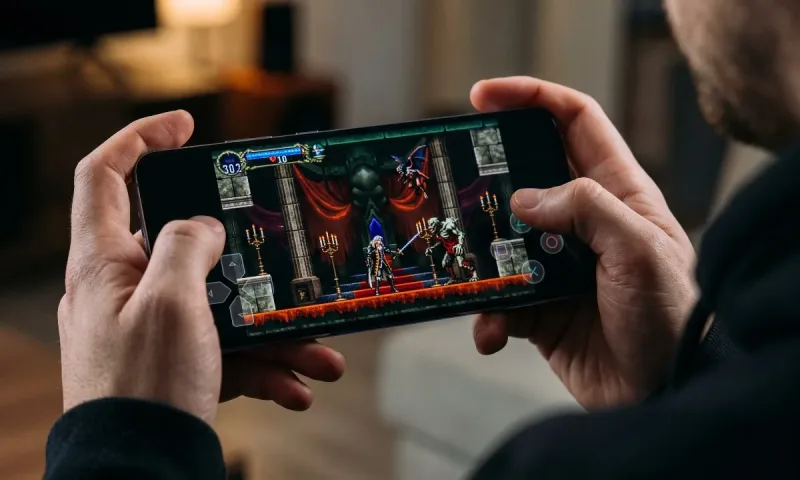
When Konami dropped Castlevania: Symphony of the Night onto the Google Play Store with virtually zero prior marketing, it felt almost like a fever dream. This is arguably the definitive blueprint of an entire video game genre—the literal "vania" in Metroidvania—arriving on modern mobile hardware for roughly three dollars.
For years, mobile gaming has battled a stubborn reputation: an ecosystem flooded with gacha microtransactions, aggressive energy timers, and watered-down legacy ports. Jumping into this comprehensive Castlevania: Symphony of the Night android game review, the central question isn't whether the 1997 classic itself holds up—its masterclass pedigree is undeniable. The real question is whether Dracula’s gothic corridors survive the messy transition to a glass touchscreen, and whether this Android port does justice to Alucard’s legendary quest.
What Version Are We Actually Playing?
To understand this port, you have to trace its lineage. The Android release isn't a direct rip of the beloved 1997 PlayStation 1 disc, nor is it an emulated ROM wrapped in a cheap launcher. Instead, it is built upon the PSP remaster featured in The Dracula X Chronicles (which also formed the foundation of the PlayStation 4 Castlevania Requiem package).
What does that mean for you?
-
The Voice Acting & Script: The famously campy, meme-worthy original voice acting ("What is a man? A miserable little pile of secrets!") is gone. In its place is the re-recorded, more subdued PSP script. Purists might miss the nostalgic cheese, but the delivery here is technically sharper and more serious.
-
Playable Characters Out of the Box: Rather than forcing you to jump through cryptic naming hoops after a clear save, you can play through the sprawling layout as Richter Belmont or Maria Renard right from the file selection screen.
-
Modern Touches: You get dedicated achievement tracking synced via Google Play Games, quick continues, and streamlined inventory navigation adapted for mobile panels.
Also read: Chrono Trigger Android Review
Visuals, Audio, and Performance
Graphically, the game is an absolute triumph on modern mobile displays. Mobile phone OLED screens do wonders for the game’s pixel art. The cavernous blues of the castle's subterranean water channels, the vibrant golds of the Royal Chapel, and the eerie crimson glow of the blood fountains pop with unmatched clarity.
Dotemu handled the heavy lifting of the porting duties, and the frame pacing is buttery smooth. Even when the screen is crawling with floating medusa heads, decaying zombies, and particle effects from Alucard's familiars, framerates remain locked. One minor quirk to look out for: on certain high-refresh-rate displays (90Hz, 120Hz, or 144Hz), the game engine can occasionally feel slightly jittery unless your phone's display settings are toggled to standard 60Hz. Once dialed in, it runs virtually flawlessly.
The audio, meanwhile, remains sacred. Michiru Yamane’s soundtrack is one of the greatest compositions in interactive media, effortlessly weaving gothic pipe organ swells, thrash metal riffs, haunting ambient chimes, and smooth jazz. Through decent headphones, every bass hit and crisp sword slash sounds as punchy as it did in the golden era of CRT gaming.
The Controls: A Tale of Two Inputs
Let's address the elephant in the crypt: touchscreen platforming.
The Touchscreen Experience
If you intend to play purely with your thumbs on glass, prepare for a learning curve. Symphony of the Night requires nuanced momentum, quick directional changes, backdashing, and simultaneous jumping and slashing.
The developers did make some smart concessions for mobile users:
-
One-Touch Spell Casting: Anyone who played the original knows that pulling off fighting-game inputs (like the infamous
Left, Right, Down-Right, Down, Down-Left, Left, Right + Attackfor Soul Steal) was cumbersome. On Android, discovered spells gain quick-tap shortcut icons along the top of the interface, which softens the blow of playing without physical buttons. -
Quick Shape-Shifting: Transforming into a Wolf, Bat, or Mist is accessible via intuitive onscreen triggers.
Despite these accommodations, virtual directional pads can never replicate the tactile feedback of a real D-pad. In chaotic boss encounters—such as the battle against Legion or the dual assault of Galamoth—your thumbs will inevitably slip, resulting in an unintended jump or an attack fired in the wrong direction. It is completely playable, but it demands patience.
The Controller Experience
Plug in a USB-C controller or clip your phone into an external gamepad, and this immediately transforms into the single best way to play the game on the go. The game natively recognizes modern Bluetooth and wired controllers without requiring third-party key-mapping apps. Input latency drops to zero, muscle memory takes over, and the experience easily rivals playing on a dedicated console.
Deep Exploration and RPG Progression
What cemented Symphony of the Night as a timeless classic was its departure from the linear, whip-cracking action of early Castlevania titles. Instead, it introduced broad RPG elements and interconnected, nonlinear exploration.
Alucard begins the journey stripped of his legendary gear, leaving you to scavenge the castle for swords, shields, armor, and relics. The level-up system provides a constant dopamine drip: every slain monster feeds your stat pool, gradually transforming Alucard from an underpowered dhampir into an unstoppable whirlwind of blades and sorcery.
The castle itself is the real star of the show. It is littered with breakable walls, invisible elevators, clock towers hiding secret pathways, and cryptic puzzles that reward curiosity. Just when you believe you have mapped out the entire castle and beaten the final encounter, the game pulls off one of the most famous mid-game twists in gaming history—revealing an entire Inverted Castle that effectively doubles the playtime and cranks the difficulty up significantly.
Port Pros and Cons
| Strengths | Weaknesses |
| Priced at a flat $2.99 with zero microtransactions or ads | Virtual touch buttons clutter screen and can cause input errors |
| Flawless native controller support (plug-and-play) | Lack of cloud saves makes multi-device play cumbersome |
| Extra content: Play as Richter or Maria from the start | High-refresh panels can exhibit slight visual micro-stutter |
| Dedicated one-touch shortcuts for complex magic spells | Replacement of the original campy PS1 voice acting |
| Gorgeous pixel rendering on OLED screens | Occasional inconsistency with the auto-continue state |
Where the Port Stumbles
While this release is easy to recommend, it is not without rough edges.
The most glaring omission is the absence of Google Play Games cloud saving. If you upgrade your device, switch between a phone and an Android tablet, or accidentally clear your local app data, your hard-earned progress disappears into the ether. In a 15- to 20-hour game heavily focused on grinding rare weapon drops (like the elusive Crissaegrim), losing a save file is painful.
Additionally, the UI overlays feel slightly dated. While the quick-magic shortcuts are functional, the icons and border elements look somewhat tacked on rather than natively integrated into the game's baroque aesthetic.
Is It Worth Playing on Android?
For three dollars—less than the price of a takeout coffee—Castlevania: Symphony of the Night on Android is one of the absolute best values in the entire mobile gaming landscape.
If you are stuck purely using touchscreen inputs, it remains a fun, nostalgic trip, provided you have the patience to adapt to virtual thumbsticks. But if you pair your device with an external controller, it becomes an essential installation. Whether you are a retro gaming veteran re-exploring the Inverted Castle for the tenth time or a newcomer discovering why the genre bears its name, this port stands tall as a masterwork of atmosphere, music, and level design that fits right in your pocket.




Comments
No comments yet. Be the first to ask a question or share an update.
Leave a comment
Your mobile number is never published. Comments appear after review. Website links, email addresses and code are not allowed.