
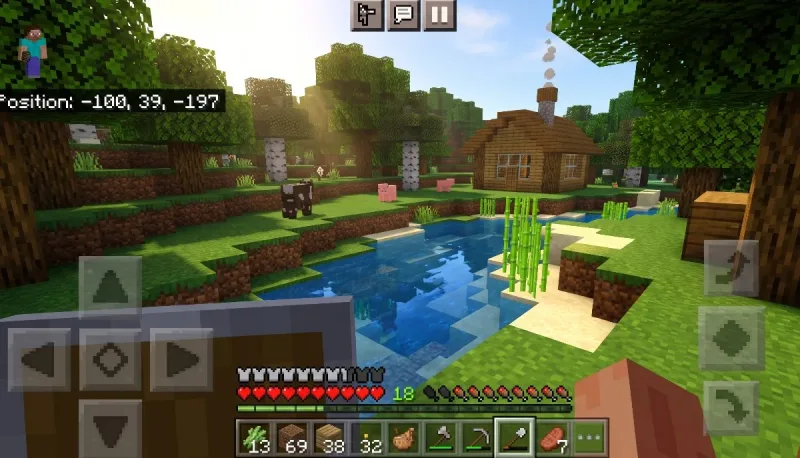
There is something strangely hypnotic about digging a virtual hole into the side of a mountain while sitting on a crowded morning train. Ten years ago, the idea of having an entire, seamless, infinitely generating open world in your pocket sounded like wishful tech daydreaming. Mobile games back then were largely swipe-and-dash distractions or stamina-gated micro-puzzles.
Then came the evolution of Mojang’s powerhouse. If you are scouring the internet for an honest, boots-on-the-ground Minecraft android game review, you are likely asking one simple question: does a game designed around expansive landscapes, heavy computational crafting, and fast-paced survival combat actually work on a touchscreen device?
The short answer is yes. The longer, far more interesting answer is that playing Minecraft on an Android device has transformed from a compromised "Pocket Edition" experiment into one of the most complete, versatile handheld gaming experiences you can buy today.
From "Pocket Edition" to Real Bedrock
To appreciate where Minecraft on Android stands today, it helps to remember where it started. Early mobile players will remember the clunky days of "Pocket Edition"—tiny, restricted maps, invisible boundary walls, missing nether dimensions, no redstone, and stripped-down crafting menus. It felt like a demo toyed with on an iPod Touch.
Today, those training wheels are completely gone. The Android version runs on Mojang’s modern Bedrock Engine. This is not a downgraded port; it is the exact same underlying architecture that powers the game on the Xbox Series X, PlayStation 5, Nintendo Switch, and Windows PC.
When you boot up Minecraft on your phone or tablet, you are loading genuine infinite worlds. You get the sprawling cave systems that dive hundreds of blocks deep, lush subterranean biomes, looming ancient cities, trials chambers, breeze mobs, and fully realized Nether and End dimensions. Everything present in modern desktop updates is right here in your hands.
Also read: Pure Geometry, Modern Clutter
Touch Controls vs. Physical Hardware
Controls make or break any mobile port, especially for a game that demands three-dimensional spatial awareness, quick platforming, and twitch combat reactions.
For years, the classic mobile d-pad felt stiff and floaty. Fortunately, Mojang overhauled its touch control suite, giving players three distinct control paradigms to pick from:
-
Joystick and Tap: The classic approach with an analog joystick on the left, using tap-to-mine anywhere your thumb lands.
-
Joystick and Aim Crosshair: Adds a desktop-style fixed reticle to the screen center with dedicated right-side action buttons for hitting, interacting, jumping, and sneaking.
-
D-Pad and Tap to Interact: A tactile fallback preferred by players on smaller screens who want explicit directional taps.
If you stick strictly to touch controls, there is a definite learning curve. Managing inventory hotbars, sprint-jumping across lava ravines, or shooting a skeleton with a bow while backing up can feel like digital finger acrobatics. You will inevitably misplace a block or accidentally punch a villager until your muscle memory settles in.
The Gamepad Transformation
Plug in an Android-compatible telescopic controller—like a Backbone One, Razer Kishi, or an Xbox wireless controller via Bluetooth—and the experience shifts entirely. The mobile UI effortlessly adapts, displaying console button prompts immediately.
With a controller snapped onto your phone, Minecraft turns into a portable console powerhouse that rivals the Nintendo Switch version—frequently running at higher frame rates and sharper resolutions depending on your device's chip.
Performance, Heat, and Battery Drain
Because Android spans thousands of hardware configurations—from $80 budget handsets to $1,300 flagship phones—performance varies across the board.
Budget to Mid-Range Devices
On phones with 4 GB to 6 GB of RAM and standard mid-range processors (like Qualcomm Snapdragon 6/7 series or MediaTek Dimensity chips), the game runs surprisingly well out of the box. You may need to keep your render distance around 8 to 12 chunks and turn off fancy graphical toggles like "Beautiful Skies" or "Smooth Lighting" to maintain a solid 60 frames per second.
Flagships & Tablets
On modern flagship silicon (Snapdragon 8 Gen series or equivalent), Minecraft is a sight to behold. You can push the render distance out to 16–22 chunks, enable full graphical flourishes, and enjoy silky-smooth 90 Hz or 120 Hz refresh rates if your screen supports it. The expansive field of view makes building megastructures on a larger Android tablet an absolute joy.
The Thermal Reality
Be prepared for battery drain. Minecraft pushes your GPU and CPU continuously—generating terrain, calculating lighting changes, ticking entity behavior, and updating mob AI. Expect to lose roughly 15% to 25% of battery per hour of continuous play. If you play for extended sessions on high brightness and maximum render distance, your phone will get noticeably warm to the touch. It is good practice to dial your chunk distance down when you are traveling without a charger nearby.
Gameplay Loops: Choose Your Own Pace
The core gameplay of Minecraft remains universally compelling because it respects the player's personal rhythm. That flexibility shines exceptionally bright on a mobile device:
1. Survival Mode
You spawn empty-handed in a randomly generated wilderness with nothing but sunlight and the sound of birds. Before dusk settles, you must punch wood, assemble a crafting table, fashion primitive tools, and construct a shelter to protect against creeping spiders, zombies, and exploding creepers.
Survival on mobile feels intimate. Chopping trees, mining iron veins in the deep slate, and cultivating wheat farms makes for ideal pick-up-and-play sessions. You can clear out a cavern during a quick lunch break, tap save-and-quit, and jump right back in later without losing a second of progress.
2. Creative Mode
No health bars, no hunger meters, infinite resources, and the god-like ability to fly. Creative mode on Android functions as an infinite, portable digital sketchbook. Whether you want to prototype complex redstone contraptions or build gothic castles, touch controls make placing and clearing vast arrays of blocks fast and intuitive once you master the flying mechanics.
3. Adventure & Servers
If solitary building feels lonely, the Android client features direct integration into massive community servers like The Hive, Cubecraft, and Mineville. Mini-games like BedWars, hide-and-seek, and skyblock parkour are populated by thousands of players around the clock.
Multiplayer and Cross-Play Magic
Perhaps the most impressive technical achievement of Minecraft on Android is its frictionless cross-play.
Thanks to Xbox Live / Microsoft account integration, an Android player can build side-by-side with friends playing on a Windows PC, a PlayStation 5, a Nintendo Switch, or an iPhone. There are no server barriers or watered-down feature restrictions between devices.
If you subscribe to Minecraft Realms—Mojang’s monthly cloud-hosted server service—your primary world lives securely online. You can spend an afternoon playing on your home desktop, step outside, pull your phone from your pocket, and seamlessly resume working on the exact same base from the bus stop. For groups of friends with varied hardware, this cross-progression is unmatched in the mobile gaming landscape.
Modding, Add-Ons, and the Marketplace
Customization is the lifeblood of the broader Minecraft community, and Android handles this far better than closed console ecosystems.
The In-Game Marketplace
For a streamlined, one-click experience, the built-in Marketplace offers community-made skin packs, texture overhauls, custom mini-game worlds, and gameplay add-ons. These cost "Minecoins" (purchased with real money). While some content is high-quality, the Marketplace can feel heavily commercialized, filled with bright micro-purchases that target younger players.
Free Third-Party Add-Ons
Because Android features an open file system, you are not locked into the paid Marketplace. Players can freely download .mcpack and .mcworld files from legitimate community hubs like MCPEDL. You can install custom shaders, behavior mods, new monster packs, and community-made maps directly into your device's game directory without paying a cent. This flexibility gives Android a massive edge over iOS and consoles.
What Holds It Back?
No game is without flaws, and the Android version has a few rough edges worth calling out:
-
Touch-Screen Clutter: On phones with screens smaller than 6.1 inches, your fingers cover significant portions of the screen. In high-stakes combat situations (like fighting the Wither or raiding an Ocean Monument), finger slips can easily lead to frustrating deaths.
-
Audio Glitches & Random Desyncs: Occasionally, Bedrock Edition exhibits quirks unseen in the Java PC version, like invisible fall-damage glitches or slight mob desynchronization when playing on slower mobile data connections.
-
The Java Divide: While Bedrock matches Java feature-for-feature on surface content, subtle mechanics—such as off-hand shield usage, redstone quasi-connectivity, and combat cooldown sweeps—differ. Java veterans switching to mobile will need time to adjust to Bedrock's distinct combat feel.
Pros and Cons
| Strengths (Pros) | Weaknesses (Cons) |
| True, complete Bedrock experience with infinite worlds | Touch controls can feel clumsy during high-stakes combat |
| Full cross-platform play with PC, Switch, Xbox, and PlayStation | Heavy battery consumption and thermal buildup on long sessions |
Open modding via free external .mcpack files and textures |
In-game Marketplace pushes frequent microtransactions |
| Flawless controller and keyboard support | Combat and redstone mechanics differ slightly from the PC Java version |
| One-time purchase with zero forced pay-to-win mechanics | Smaller phone screens can feel crowded with on-screen touch buttons |
The Final Verdict
At roughly $7 on the Google Play Store, Minecraft on Android is easily one of the highest-value purchases in all of mobile gaming. It is not an ad-riddled copycat, a pay-walled clone, or a truncated mobile spin-off; it is the definitive, feature-complete global phenomenon running right inside your pocket.
Whether you treat it as an occasional creative sandbox during slow commutes or hook up an external controller to tackle the Ender Dragon with friends across the globe, it delivers endless creative freedom. If you have any love for exploration, survival crafting, or world-building, Minecraft on Android belongs permanently installed on your device.



Comments
No comments yet. Be the first to ask a question or share an update.
Leave a comment
Your mobile number is never published. Comments appear after review. Website links, email addresses and code are not allowed.